How to Use a Live Online Study Room: A Student's First-Session Guide
Discover how live online study rooms work, what features to use, and how to study alongside others with better focus and accountability.

StudyLivo Editorial
Focus & Habit Research • @studylivo
Studying alone can sometimes feel like you are the only person trying to get something done.
You open your laptop, arrange your notes, and prepare to start. But after a while, distractions appear. You check your phone, switch between tabs, or postpone the task you originally planned to complete.
Now imagine opening your laptop and seeing other people working alongside you.
Someone is revising for an examination. Another person is reading a textbook. Someone else is completing an assignment. Everyone has a different goal, but everyone has joined the same space to focus.
That is the idea behind a live online study room.
Unlike a recorded study-with-me video, a live study room allows participants to share an active virtual environment. Depending on the platform and room settings, participants may be able to see one another, communicate through chat, and use focus tools while working on their individual tasks.
But what actually happens inside these rooms? How do you participate? Do you need to talk to everyone? And how can you make your first session worthwhile?
This guide walks through the experience, from joining a room to completing your first focused session.
1. What Is a Live Online Study Room?
A live online study room is a virtual space where multiple people come together to study or work at the same time.
Instead of studying in a physical library, participants connect through an online platform and share a common study environment.
Everyone can have a different objective.
For example:
- A university student might be revising lecture notes.
- A competitive examination aspirant might be solving mathematics questions.
- A programmer might be practising coding.
- A school student might be completing homework.
- A remote learner might be preparing for an online course examination.
They do not necessarily need to study the same subject.
The shared purpose is to spend time working in an environment where other people are also concentrating.
How is a live study room different from a study-with-me video?
These experiences can look similar, but there is an important difference.
| Study format | How it works |
|---|---|
| Study-with-me video | You watch a recorded or streamed study session |
| Online study group | Students discuss subjects or complete collaborative activities |
| Live online study room | Participants share an active virtual study environment |
| Individual Pomodoro timer | You manage your own focus and break intervals |
A live study room combines the shared environment of group studying with the flexibility of individual work.
You can concentrate on your own material without having to follow somebody else's timetable or subject.
2. What Happens Inside a Live Online Study Room?
The experience depends on the platform, but a live room can bring several useful activities together in one place.
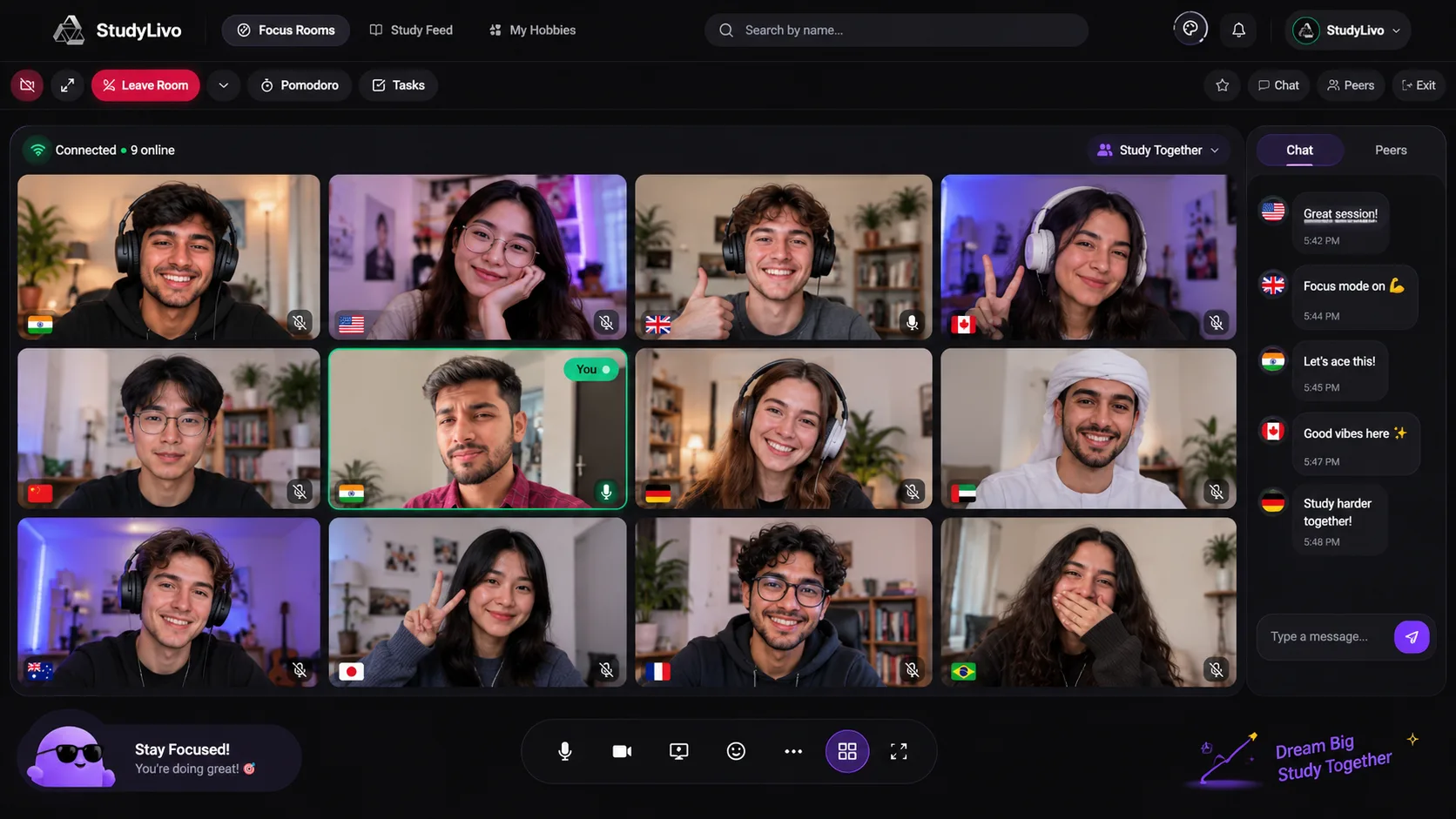
For example, the StudyLivo room interface brings together participant video tiles, room controls, communication features, and focus-related tools.
Inside a StudyLivo live study room, learners share a virtual environment and work toward individual study goals — with a participant grid, chat panel, peer controls, and session tools visible in one place.
Here is how to understand the different parts of the interface.
A. Participant video grid
The participant grid is the central part of the room.
It allows participants to see other people who are connected to the session.
This shared visual environment can make an online study room feel more like sitting in a library with other learners rather than studying completely alone.
You can concentrate on your own work while knowing that other participants are present.
Camera and microphone controls allow participants to manage their own participation according to the available room settings.
B. Chat and communication panel
A live study environment does not have to be completely silent.
A chat panel can provide a convenient way to exchange short messages without turning the entire session into a conversation.
For example:
- "Starting a 45-minute revision session."
- "Taking a short break."
- "Finished today's mathematics practice."
- "Good luck with your preparation!"
The key is to keep communication purposeful.
The objective is to support the study environment rather than create another source of distraction.
C. Peers and room participation
A shared study room brings together people with different academic goals.
The peer panel can help participants view the people connected to their room, depending on the platform's available functionality.
Remember that you do not have to know everyone personally before joining a shared study environment.
You can participate respectfully, follow the room expectations, and focus on your own work.
D. Pomodoro and task controls
Focus tools can help organize a study session.
In the StudyLivo interface, you can see dedicated Pomodoro and Tasks controls.
A Pomodoro-style approach divides work into focused periods separated by breaks.
The Tasks feature can help organize what you intend to complete.
For example, before starting, you might list:
- Revise one physics chapter.
- Solve 15 practice questions.
- Review incorrect answers.
- Prepare tomorrow's revision notes.
Having a clear task list gives your session direction.
Rather than spending an hour connected without a specific objective, you know what you want to accomplish.
3. How to Join and Start Your First Online Study Session
Your first session does not need to be complicated.
The best approach is to prepare one achievable goal and choose a room that matches your preferred working style.
Step 1: Decide what you want to accomplish
Start with one specific objective.
Instead of saying, "I will study for two hours," choose something measurable.
For example:
- Complete one chapter.
- Solve 20 practice questions.
- Revise 30 vocabulary words.
- Finish an assignment section.
- Review notes from the previous lecture.
Your objective should be realistic for the time available.
Step 2: Choose a suitable study environment
Think about the type of environment you need.
Do you prefer uninterrupted work? A timed session? Or a room where you can occasionally interact with other learners?
Different room formats can support different preferences.
A silent study environment may suit reading and revision, while a Pomodoro-style environment can help organize shorter work periods. Browse the online study rooms hub to pick a format.
Step 3: Prepare your study materials
Before joining, keep everything you need nearby.
This might include:
- Textbooks and notebooks.
- Your laptop and charger.
- Lecture notes.
- Practice papers.
- A list of study tasks.
- Water and other essentials.
Preparing beforehand reduces the number of reasons to leave your desk once the session begins.
Step 4: Understand the room controls
Take a moment to understand the interface.
Check the available microphone, camera, chat, peer, and focus controls.
You do not need to interact with every feature.
Choose the controls relevant to your session and follow the platform's room guidelines.
Step 5: Start studying
Once you are ready, begin your planned task.
Avoid waiting for everyone else to start.
A shared study environment is most useful when you use it to support your own progress.
4. Do You Need to Talk in a Live Study Room?
No.
One of the most useful aspects of a shared study environment is that participants can work independently.
You can join a room without turning the session into a group conversation.
There are three common participation styles.
Silent participation
You focus on your own work and minimize communication.
This is useful for:
- Reading.
- Writing.
- Revision.
- Solving practice questions.
- Preparing examination notes.
Occasional communication
You communicate briefly during breaks or when there is something relevant to share.
This can help create a friendly environment without interrupting every focus period.
Collaborative participation
When the room and its rules support it, participants can exchange ideas and discuss academic questions.
This is more suitable for learners working on similar topics.
The important thing is to respect the purpose of the room.
Not every participant is looking for a conversation. Some simply want a place where they can concentrate alongside others.
5. How to Make Your Live Study Session More Productive
Joining a room is only the beginning. What you do during the session matters.
Here are five practical ways to make better use of your time.
1. Set a goal before joining
Write down what you want to finish.
A specific goal makes it easier to begin and review your progress.
2. Keep your study materials ready
Avoid repeatedly leaving your workspace to search for books, files, or notes.
Prepare everything before the session starts.
3. Use manageable focus periods
You can experiment with different work-and-break intervals.
For example:
| Focus period | Break | Suitable for |
|---|---|---|
| 25 minutes | 5 minutes | Short revision tasks |
| 40 minutes | 10 minutes | Reading and practice |
| 50 minutes | 10 minutes | Longer assignments |
These are suggested starting points, not universal rules. Adjust them according to the work you are doing and your ability to maintain concentration.
4. Avoid unnecessary conversations
A quick message can be encouraging. Constantly checking the chat can interrupt your work.
Keep communication for relevant moments.
5. Review what you completed
Before leaving the room, check your original goal.
Ask yourself:
- What did I finish?
- What remains incomplete?
- What should I work on next?
- What would make the next session better?
This small review helps turn individual study sessions into a more consistent routine.
6. Can You Study With People From Different Countries?
Online study environments can make it possible to share a study space with people who are geographically far apart.
Unlike a physical library, a virtual room is not restricted to people living in the same neighbourhood or attending the same institution.
This can create opportunities to connect with learners who have different academic interests, backgrounds, and schedules.
However, different time zones can make coordination difficult.
Here are a few ways to handle that:
- Choose a regular time that works with your schedule.
- Join an existing room when arranging a private session is inconvenient.
- Set your own study objective instead of depending on everyone else's timetable.
- Use chat thoughtfully when participants are working at different times.
You do not need everyone to have the same schedule or study goals to benefit from a shared virtual environment. For late hours, see our guide on focus across time zones.
7. Online Study Room Etiquette: What Should You Do?
A productive shared environment depends on how participants treat one another.
A few simple habits can make the experience more comfortable for everyone.
- Respect other people's concentration — avoid unnecessary interruptions during focused work periods.
- Follow the room's communication expectations — if the session is intended for silent study, avoid starting unrelated conversations.
- Be mindful of your microphone and camera — use the available controls appropriately and respect other participants' preferences.
- Avoid sharing private information — you do not need to disclose personal details to participate in a study session.
- Keep the environment welcoming — everyone is there for a reason. Treat other learners with patience and respect.
For a more detailed explanation of shared study-space expectations, read our guide to online study room rules.
8. Why Use StudyLivo for Live Online Study Sessions?
Sometimes, the hardest part of studying is not finding material. It is finding an environment that helps you actually begin.
You might already have your timetable, textbooks, and study goals. But studying alone can feel repetitive, especially when you are spending long hours preparing for an examination or completing academic work.
StudyLivo brings learners together through live online study rooms.
The platform is designed around shared focus, individual participation, and peer accountability.
With StudyLivo, you can explore:
- Live study rooms: Join a shared environment where other learners are also working.
- Participant grid: See the people participating in the room.
- Communication features: Use available chat and peer controls.
- Focus tools: Access the Pomodoro and Tasks controls shown in the study-room interface.
- Different study preferences: Find an environment that suits your approach to focused work.
You do not need to study the same subject as everyone else.
You can work on your own academic goals while sharing the experience of studying alongside other learners.
If you want to experience a live virtual study environment, explore StudyLivo's online study rooms.
Choose a study environment, prepare your next task, and give yourself a place to begin.
Conclusion: Your Next Study Session Can Start With One Simple Step
A live online study room is more than a video call.
It is a shared environment where people can work on individual goals while being part of a wider study community.
You can use it to create structure, organize your focus periods, communicate when necessary, and make studying feel less isolated.
You do not need a complicated routine or a group of friends studying the same subject.
Start with one achievable goal. Join a suitable study environment. Focus on your work and review what you accomplish.
If you are ready to experience studying alongside other learners, explore StudyLivo's live online study rooms and find your next place to focus.
Study together. Stay focused. Keep moving forward.
Study beside focused peers in real time
StudyLivo is a free online study platform. Choose between quiet Pomodoro intervals, silent library sprints, or extended deep work blocks.
Read more
Online Study Rooms for Every Focus Style
Online Study Rooms for Every Focus Style
Live virtual rooms with synchronized Pomodoro timers, silent study, and 24/7 accountability.

Quiet Room Rules: Live Study Room Etiquette
A live room stays calm when everyone protects focus. Learn camera choice, muted microphones, short chat, graceful arrivals, and what to do when a room is full.
2026-11-01

Study at Night: Focus Across Time Zones on StudyLivo
Study at night without studying alone. Join a live room, pick Deep Work, Pomodoro, Silent, or Night Owls, and focus with people whose day has already begun.
2026-11-01
Frequently asked questions
What is a live online study room?
A live online study room is a virtual space where multiple learners connect at the same time to study or work. Participants can work on individual tasks while sharing an online environment.
How do virtual study rooms work?
Virtual study rooms use online platforms to bring participants into a shared environment. Depending on the platform, they may include video, chat, peer lists, timers, and other focus-related tools.
Can I study with strangers online?
Yes. Some online study platforms allow learners to join shared study rooms with people they do not personally know. Participants can study independently while respecting the room's guidelines.
Do I need to turn on my camera in an online study room?
Camera requirements depend on the platform and room settings. On StudyLivo, camera is optional — check the available controls and participation guidelines before joining.
Can I study different subjects in the same virtual study room?
Yes. A shared study environment does not necessarily require everyone to study the same subject. Participants can work on individual academic goals.
Are live online study rooms better than studying alone?
It depends on your preferences. Some learners prefer complete solitude, while others find a shared environment useful for creating structure and accountability. Try different approaches and see which works best for your study habits.
What should I do in my first live study session?
Choose one achievable task, prepare your materials, understand the room controls, and begin working. Review your progress before leaving the session.
Where can I find an online study room?
You can explore online study communities and platforms that offer shared virtual study spaces. StudyLivo provides live online study rooms where learners can study alongside others at studylivo.com/online-study-rooms.